Overview
Role: UX Designer
Scope: Mobile-first web application, diagnostic decision trees, customer dashboard integration
Tools: Adobe XD, Microsoft Office
Status: Completed hand-off specs & interactive prototypes (Implementation paused due to internal priorities)
Partners: Peer UX Designer, Agency UX Lead, Business Analysts, Technical Writers, HVAC Subject Matter Experts (SMEs)
1. Overcoming the Challenge
The Challenge
Lennox field technicians diagnosing complex furnace and AC issues relied on an old lookup page that was little more than a static list of bullet points. It lacked depth and left technicians to piece together troubleshooting steps manually on job sites.
The Solution
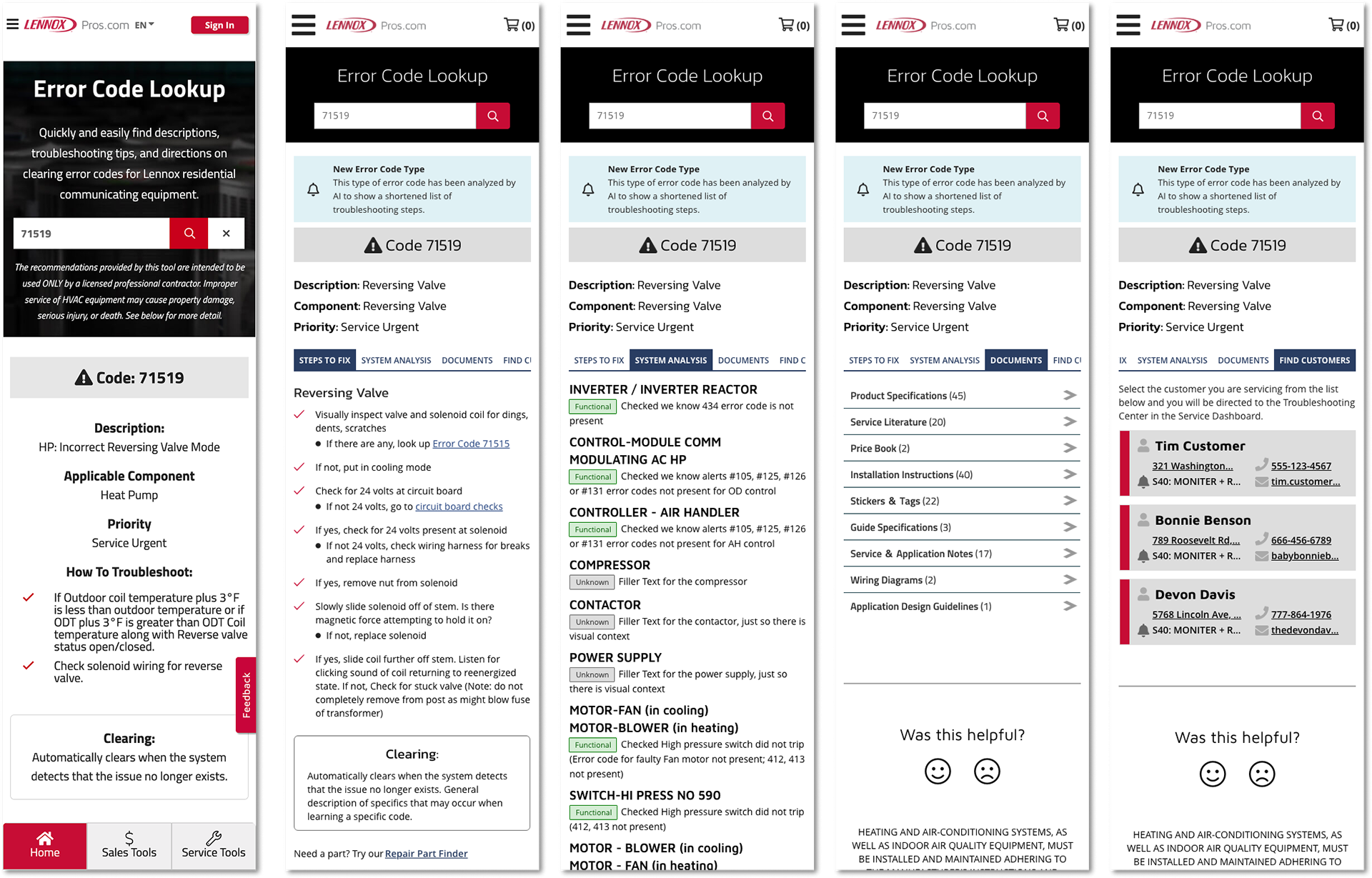
I led the UX redesign for the Error Code Lookup tool (internally dubbed "Error to Action"), transforming static text into an interactive, step-by-step diagnostic wizard. Soon after joining, our team experienced sudden leadership turnover, requiring me and another designer to step up, manage our Adobe XD design system, and keep project momentum moving forward. The final design guided technicians through branching decision trees, linked directly to PDF technical manuals and part ordering, and logged diagnostic histories straight into customer account dashboards.
2. Navigating Constraints & Process
Working in a legacy environment meant adapting to a company where UX was still brand new and constantly working to prove its value. Direct field research and user testing with technicians wasn't part of the established process. While I knew field testing would have uncovered crucial insights and likely reshaped parts of the design, I was still early in my career and lacked both the organizational support and the confidence to push back and make the business case for user research.
Instead, I adapted to the tools and structures available:
Adapting to BRDs: We didn't use Jira or Azure DevOps for this project; I worked directly from Business Requirement Documents (BRDs) alongside Business Analysts and Technical Writers.
Rigorous Documentation: To keep alignment tight and prevent misunderstandings, I maintained active question logs inside working copies of the BRD—highlighting edge cases, tagging teammates, and tracking technical feasibility before jumping into design software.
SME Collaboration: I leaned heavily on internal Subject Matter Experts (SMEs) to translate their implicit, "automatic" troubleshooting knowledge into structured logic paths.
3. Solution: The "Error to Action" Workflow
The core of the design was a mobile-first experience built for technicians on smartphones in tight spaces, scaling up to tablet and web views.
Interactive Decision Trees: Technicians launched an interactive wizard that guided them through structured, yes/no branching logic tailored to specific equipment error codes.
Dual-Mode Access: We provided an active troubleshooting mode for guided step-by-step diagnosis alongside a read-only reference version for experienced techs needing fast documentation access.
Parts & Documentation Integration: The tool connected error codes directly to required replacement parts and linked PDF technical manuals for immediate reference.
Account Dashboard Logging: Technicians could log findings directly to the customer’s account while on site, making the history accessible through the customer dashboard later.
4. Key Learnings & Takeaways
Embracing Strategic Partnership: Early on, I viewed UX as "us against the stakeholders." I learned that design thrives when we operate as collaborative business partners—using clear documentation and open communication to bring everyone along.
Proactive Cadence: Working with our agency UX Lead taught me the value of pushing designs to natural review points quickly ("getting the ball in their court") and using downtime to keep design systems clean.
Navigating Project Lifecycles: While the project was ultimately paused prior to development, completing the end-to-end design specs and interactive prototypes was a pivotal milestone in my growth. It proved that valuable UX design is as much about structuring complex information and building alignment as it is about shipping final code.